SwiftPay Dashboard
Simplifying Operations for 150+ SMBs
SwiftPay Dashboard
Simplifying Operations for 150+ SMBs
2022 - Shipped
Helping businesses optimise their banking workflow
SwiftPay, a Point of Sale solution within a merchant banking system, serves small and medium-sized businesses that hold accounts with the bank.
At Idealoft, we were brought in to redesign the Admin Dashboard — a tool relied on daily by team leads, inventory managers, and business owners to run their operations.
Organization
ICICI Bank
Team
Me, 2 Product Managers,
3 Developers
Timeline
3 months

The original dashboard: no information for merchants to take away
What is Swiftpay?
SwiftPay is part of India's largest banking ecosystem, valued at $390 billion.
One of the bank's offerings is its POS service for merchants, enabling 4,70,000 merchants across India to securely accept payments online.
Part of the system is SwiftPay, transaction analysis platform where merchants can track their businesses through a consolidated dashboard.
The Opportunity
The data presented to merchants through SwiftPay
made the working of a shop more efficient

Without any user data, I pushed for a research first approach
To understand the gap, we got in touch with customer support and informally connected with SMB owners — going straight to the people using the dashboard every day, rather than relying on assumptions.
We spoke to 4 SMB owners directly, which surfaced the friction points that shaped the rest of the design.
Context
Redesign the Admin Dashboard - no detailed problem list, just a request to improve it.
What we did know was that the bank had already validated SwiftPay with merchants. The product worked. So the real question wasn't whether SwiftPay was useful, but whether the dashboard was serving the people using it every day.
The brief

Impact
SMBs onboarded
150+
~30%
~17%
~46%
Chargeback errors
Task completion
time
Refund transactions
The Opportunity
The data presented to merchants through SwiftPay
made the working of a shop more efficient
Detailed Solution
Enhancing the dashboard with
more comprehensive metrics
The dashboard homepage provides a quick overview of business performance, with separate sections for transactions and refunds, offering a comprehensive view of the financial activity.
Furthermore, to facilitate ease of use, we integrated commonly utilized filters, enabling users to efficiently narrow down data.
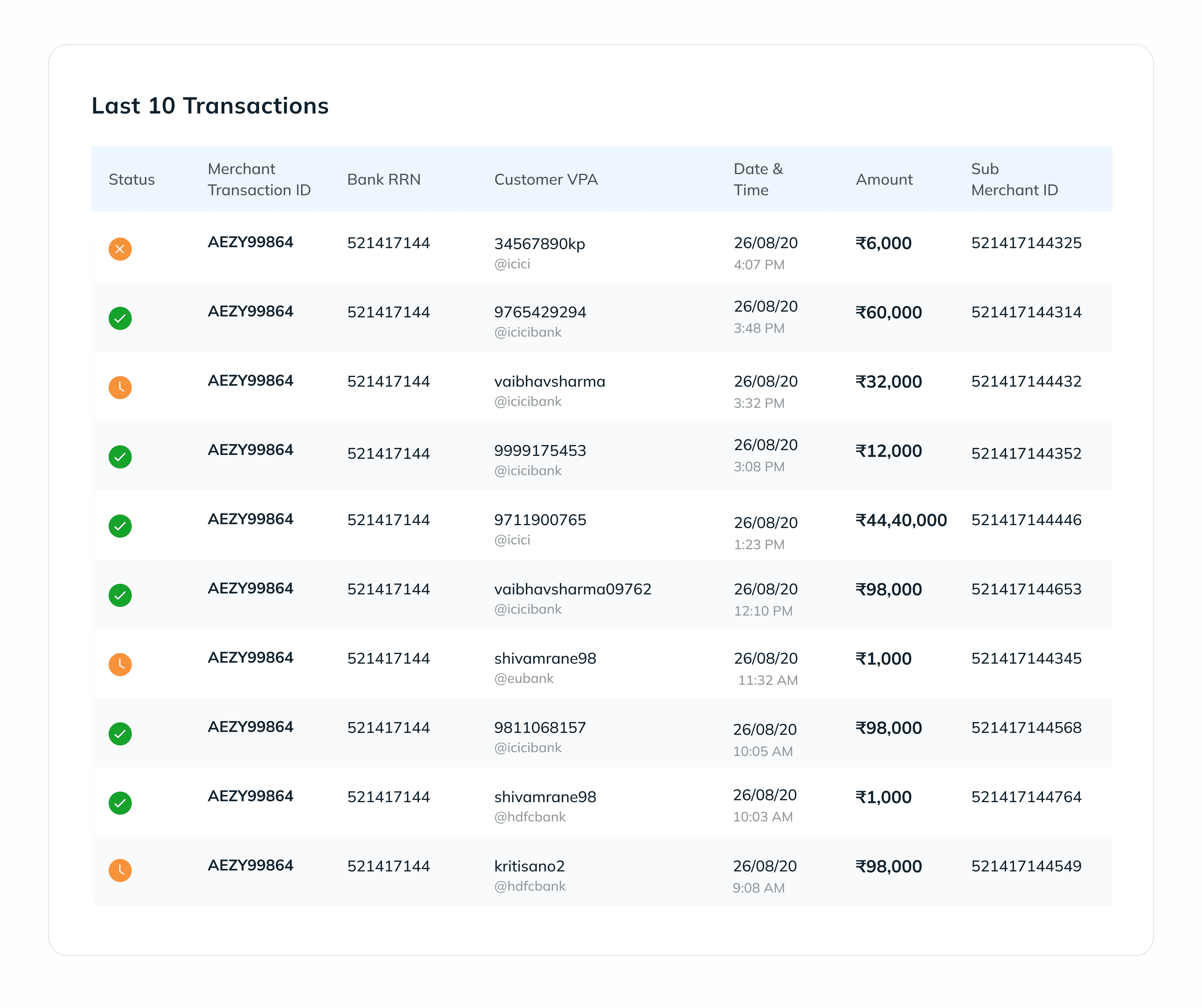
Data tables were the primary component that was being used across the platform. There were more than 13 data points and based on user research, we identified 7 of the the most common data points used my merchants to identify a transaction.
Simplifying transaction and refund
summary for faster issue detection
Identifying transactions became easier,
we further simplified refunding transactions.
To streamline the process of identifying transactions, I condensed transaction data into a table format, facilitating easy scanning and identification. Additionally, implementing a search feature allowed efficient filtering based on user parameters, simplifying identification and resolution.
I kept information that was critical upfront, clicking on a particular transaction revealed more information about the transaction in a pop-up. The user can simply file for a refund in this flow.
Redesigning chargeback management
to facilitate timely resolution
To reduce cognitive load and enhance efficiency, we showed selective information upfront in a table. Quick actions were incorporated alongside each entry, allowing users to swiftly take necessary actions.
3 crucial project learnings
through the cycle
Reflections
01
Understanding
development constraints
Recognizing that not all design solutions could be implemented as initially envisioned due to development constraints.
03
Leveraging existing
design systems
This allowed me to dive into problem-solving rather than starting from scratch. This approach enabled me to focus on addressing the project's challenges while still having the flexibility to adapt and iterate.
02
Validation through
collaboration
With demanding deadlines and client expectations, I stayed on track by validating my design decisions with both clients and the Idealoft team.
BEFORE
Interface that buried data
in complex tables
AFTER
Simple, focused and
action-based interface
Business owners struggle to incorporate SwiftPay
into their workflow
Shop owners and their staff need to keep a close eye on their transactions to manage their day-to-day.
SwiftPay already captures all the data needed to surface meaningful insights but the dashboard does nothing with it. There are no analytical tools, no way to filter or compare, just raw records with no context.
SwiftPay already captures all the data needed to surface meaningful insights but the dashboard does nothing with it.
There are no analytical tools, no way to filter or compare, just raw records with no context.
On top of that, finding a specific transaction whether to process a refund or sort out a dispute is a struggle in itself. The search experience is so limited that small-shop owners, already stretched thin, find it easier to track transactions by hand in a notebook than to use the platform built to do it for them.
Setting the scene
SMB owner, Research Interview
“We don’t really understand how the platform can help us - we prefer refund manually because it’s easier that way ”
“We don’t really understand how the platform can help us - we prefer refund manually because it’s easier that way ”
SwiftPay helps merchants
manage transactions, track revenue, and
identify trends - all in one place
Simplified tables for
easy scanning

Mobile-first design

Action based dashboard
Helping businesses optimise their banking workflow
SwiftPay, a Point of Sale solution within a merchant banking system, serves small and medium-sized businesses that hold accounts with the bank.
At Idealoft, we were brought in to redesign the Admin Dashboard — a tool relied on daily by team leads, inventory managers, and business owners to run their operations.
Organization
ICICI Bank
Team
Me, 2 Product Managers,
3 Developers
Timeline
3 months
SwiftPay helps merchants
manage transactions, track revenue, and
identify trends - all in one place
Simplified tables for easy scanning
Mobile-first design
Action based dashboard
What is Swiftpay?
SwiftPay is part of India's largest banking ecosystem, valued at $390 billion.
One of the bank's offerings is its POS service for merchants, enabling 4,70,000 merchants across India to securely accept payments online.
Part of the system is SwiftPay, transaction analysis platform where merchants can track their businesses through a consolidated dashboard.
Redesign the Admin Dashboard - no detailed problem list, just a request to improve it.
Skip to solution —>
The brief
What we did know was that the bank had already validated SwiftPay with merchants. The product worked. So the real question wasn't whether SwiftPay was useful, but whether the dashboard was serving the people using it every day.
Impact
SMBs onboarded
150+
~30%
~17%
~46%
Chargeback errors
Task completion
time
Refund transactions
On top of that, finding a specific transaction whether to process a refund or sort out a dispute is a struggle in itself. The search experience is so limited that small-shop owners, already stretched thin, find it easier to track transactions by hand in a notebook than to use the platform built to do it for them.
To understand the gap, we got in touch with customer support and informally connected with SMB owners — going straight to the people using the dashboard every day, rather than relying on assumptions.
We spoke to 4 SMB owners directly, which surfaced the friction points that shaped the rest of the design.
Without any user data, I pushed for a research first approach
The original dashboard: no information for
merchants to take away
The Opportunity
The data presented to merchants through SwiftPay
made the working of a shop more efficient
Detailed Solution
The dashboard homepage provides a quick overview of business performance, with separate sections for transactions and refunds, offering a comprehensive view of the financial activity.
Furthermore, to facilitate ease of use, we integrated commonly utilized filters, enabling users to efficiently narrow down data.
Enhancing the dashboard with
more comprehensive metrics
Data tables were the primary component that was being used across the platform. There were more than 13 data points and based on user research, we identified 7 of the the most common data points used my merchants to identify a transaction.
The Opportunity
The data presented to merchants through SwiftPay
made the working of a shop more efficient
Detailed Solution
The dashboard homepage provides a quick overview of business performance, with separate sections for transactions and refunds, offering a comprehensive view of the financial activity.
Furthermore, to facilitate ease of use, we integrated commonly utilized filters, enabling users to efficiently narrow down data.
Enhancing the dashboard with
more comprehensive metrics
Simplifying transaction and refund
summary for faster issue detection
Identifying transactions became easier,
we further simplified refunding transactions.
To streamline the process of identifying transactions, I condensed transaction data into a table format, facilitating easy scanning and identification. Additionally, implementing a search feature allowed efficient filtering based on user parameters, simplifying identification and resolution.
I kept information that was critical upfront, clicking on a particular transaction revealed more information about the transaction in a pop-up. The user can simply file for a refund in this flow.
Redesigning chargeback management
to facilitate timely resolution
To reduce cognitive load and enhance efficiency, we showed selective information upfront in a table. Quick actions were incorporated alongside each entry, allowing users to swiftly take necessary actions.
3 crucial project learnings
through the cycle
Reflections
01
Understanding
development constraints
Recognizing that not all design solutions could be implemented as initially envisioned due to development constraints.
03
Leveraging existing
design systems
This allowed me to dive into problem-solving rather than starting from scratch. This approach enabled me to focus on addressing the project's challenges while still having the flexibility to adapt and iterate.
02
Validation through
collaboration
With demanding deadlines and client expectations, I stayed on track by validating my design decisions with both clients and the Idealoft team.
Made with love and tears
If something here stayed with you,
connect with me :)
Thank you for visiting
my design corner
